Tambah Penghasilan Anda

Selamat datang di blog informasi Teknologi, saya ucapkan selamat menikmati suguhan saya mulai dari AntiVirus, Berita Kontes, Dunia Teknologi, Keamanan Jaringan, Tak Berarti, Tips and tricks, Virus hingga informasi mengenai teknologi terbaru yang di gunakan banyak orang di dunia. Jadi selamat menikmati deh!!!!!!!!!!!
Showing posts with label Tips and tricks. Show all posts

Saturday, 25 September 2010

Sharing Printer di LAN

Kemarin-kemarin saya kasih tutorial mengenai cara Jaringan LAN 2 Komputer atau lebih. ditambah sama tutorial Cara Sharing File/Drive di LAN. Nah, sekarang giliran cara sharing printer di jaringan lan.... Mau coba silahkan baca dulu tutorial diatas baru baca Sharing Printer di LAN karena jika 2 tutorial diatas tidak dibaca atau dicoba percuma baca yang ini :D


Sharing Printer di LAN
Os yang saya gunakan adalah windows xp. Nah cara nya di komputer server kita harus share dulu tuh printer caranya :
1. buka windows explorer --> control panel --> printer and other hardware --> printer and faxes.
2. klik kanan pada printer yang ingin kalian share klik sub menu sharing.

selanjutnya setting di komputer client 1,2,... dst
caranya :
1. buka windows explorer --> control panel --> printer and other hardware --> printer and faxes.
2. klik menu add printer (lihat gambar)
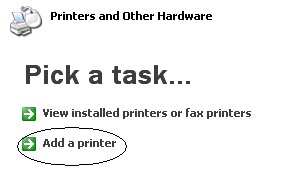

3. ntar muncul kotak dialog add printer wizard klik tombol next, selanutnya muncul lagi kotak dialog baru centang pilihan 2 "a network printer, blaaaaa bla....." klik next. (lihat gambar)


4. Muncul lagi kotak dialog baru disini gunakan pilihan browse kemudian klik tombol next dan muncul lagi kotak dialog baru dimana kita perlu mencari manual tuh printer dari komputer server yang di share.... caranya tinggal klik aja tuh komputer server 2x langsung muncul deh printer yang udah di share.... klik printer dan klik tombol next... (lihat gambar)


eng.......iengggggg............. beres deh kini printer udah bisa di pake rame2 tanpa perlu cabut pasang dari satu ke satu :D

selamat mencoba yach!!!!!!!!!!

Read More......

Tuesday, 24 November 2009

Teknik BlueJacking Menggunakan HP Nokia S60

Masih ingat tentang tutorial yang pernah saya tayangkan diblog ini dengan judul artikel Bluejacking dan Backdoor. Nah kali ini saya akan memberikan sedikit trik yaitu Teknik BlueJacking Menggunakan HP Nokia S60.


dan inilah caranya :
1.Pertama tekan joystik 5 arah kebawah.
2.Kemudian pilih options
3.Pilih NewContact
4.Pada baris pertama silahkan masukkan pesan sesuai dengan keinginan anda
5.Tekan done
6.Jika sudah selesai silahkan kembali kemenu contact
7.Tekan options
8.Lakukan scrolling menu kebawah kemudian pilih send
9.Pilih via bluetooth
10.Ponsel akan mulai mencari perangkat bluetooth
11.pilih select maka bluejacking akan mulai mengirim pesan anda keponsel bluetooth yang anda pilih tadi.

Semoga bermanfaat!!!!!!!!!!

Read More......

Monday, 5 October 2009

How to remove Autorun.inf Virus

Ever wonder why your Anti Virus detects a virus in your autorun.inf whenever you insert your removable disk (USB, flash drive, et.) but it can’t disinfect it nor delete it or if you’re having a hard time accessing drives? Tried deleting it manually but you can’t find the file?

Autorun.inf is hidden and it can’t be remove or disinfected by Anti virus. And you try finding the autorun.inf file but failed even if you select to show all files from folder option?


Here’s what you need to do…
1. Boot your system in Safemode
2. Open your flash drive via Command Prompt (do this via Start->Run->cmd.exe). 3. Change your logged drive to your USB flash drive (e.g. if your flash drive is at drive E: then type E: on the command prompt then press enter)
4. Type ATTRIB -H -R -S AUTORUN.INF then press enter
5. type in “del autorun.inf” then press [Enter]

After reboot, you can now access your drive.

Info From: http://babyface.name/2008/02/20/how-to-remove-autorun-inf-virus/

Read More......

Sunday, 23 August 2009

Cara Upgrade Bios Asrock

Upgrade Bios merupakan kewajiban kita sebagai pengguna, hal ini tak lepas dari bagaiaman cara melakukan Bios sebuah motherboard. disini saya mengambil sampel adalah motherboard Asrock. artikel ini saya buat setelah saya melakukan upgrade PC teman saya yang driver motherboard tidak support lagi. Motherboard Asrock yang saya coba untuk upgrade bios nya adalah A780GXE/128M.


Ok, deh gak usah banyak cincong lagi langsung kita bahas aja disini kayaknya!
alat dan bahan
1. 1bh Flopy disk
2. File BIOS Asrock yang baru, yang dapat kalian cari di http://www.asrock.com/support/download.asp?cat=BIOS

Langkah kerja:
1. Terlebih dahulu buatlah bootable sistem floppy disk.
2. Download file BIOS Asrock yang telah anda download tadi dari http://www.asrock.com/support/download.asp?cat=BIOS (WinZip dengan format. Ekstensi file zip), unzip file BIOS dan simpan dengan nama ASRFLASH.EXE utilitas dan BIOS file ke disk yang dibuat pada langkah 1.
3. Boot dari disk yang dibuat pada langkah 2.
4. Pada "A: \" prompt, ketik ASRFLASH, tekan space bar sekali, dan jenis BIOS nama file lalu tekan . Sebagai contoh: A: \ ASRFLASH K7S41GX2.00 maka Anda akan terlihat pesan "Please wait for BIOS loading ROM".
5. Setelah 30 detik, Anda akan melihat pesan "Flash ROM Update Completed - Pass", maka Anda telah selesai melakukan upgrade BIOS.
6. Setelah upgrade BIOS, silakan keluarkan floppy disk. Restart sistem anda dan tekan memasuki BIOS setup utilitas selama boot up.
7. Keluar dari dalam menu, pilih "Load Default Settings" dan tekan untuk melanjutkan.
8. Pilih "Exit Saving Changes" dan tekan untuk keluar dari setup BIOS digunakan.
9. Sekarang, sistem booting dengan BIOS baru.

Semoga artikel ini bermanfaat deh,

Read More......

Friday, 31 July 2009

Tips Merawat Laptop

Pengalaman ini saya bagikan buat rekan - rekan yang minim pengalaman kayak saya dalam merawat dan menggunakan laptop, biar wawasan kita lebih banyak dan lebih manthafssss untuk mengetahui kelebihan dan kekurangan dari sebuah laptop...... OK tanpa banyak basa - basi lagi ini dia cara jitu tips dan trik untuk merawat Laptop yang baik dan benar yang saya dapat melalui pengalaman saya selama ini....


1. Jangan Menggunakan Laptop dalam keadaan mencharger, Kalau mau lepaskan saja baterai laptopnya. Karena menurut pengalaman saya laptop yang digunakan dalam keadaan sedang mencharger membuat baterai menjadi cepat rusak dan kembung....
2. Jangan menggunakan laptop diatas kasur, diatas bantal atau permukaan yang lunak. Hal ini membuat pembuangan udara yang ada pada laptop mejadi terganggu dan tidak normal yang membuat laptop anda menjadi cepat panas.
3. Jangan membawa laptop dalam keadaan hidup. Hal ini bisa membuat kinerja komputer menjadi terganggu.
4. Jangan Merokok dan menyimpan minuman didekat laptop karena jika abu rokok masuk kedalam sela - sela keyboard akan membuat kinerja keyboar terganggu dan minuman bisa membuat keyboar konslet atau rusak jika tertumpah minuman.
5. Baca aturan pakai dari vendor /perusahaan pembuat laptop. Karena disana jelas sekali bagaimana dan seperti apa kita harus menggunakan laptop yang baik dan benar.

Itu semua menurut pengalaman dan hemat saya, jadi jika memang sudha mengikuti tips dan trick ini masih saja laptop kalian rusak. Mungkin saja anda terlalu memaksimalkan kinerja laptop anda. Karena semua barang elektronik itu memiliki batas waktu untuk hidup! sama kayak manusia jika terlalu dipaksa untuk bekerja dan berpikir diluar batas kemampuannya pasti sakit donk! sama kaya Laptop atau barang elektronik serupa jika kinerja nya terlalu dipaksakan bukan tidak mungkin membuat nya menjadi rusak dan kinerjanya agak melambat...... Pesan saya gunakan sesuai kemampuannya saja. Misalnya kalau laptop anda cuman menggunakan Intel Atom jangan paksakan laptop tersebut untuk melakukan hal untuk bermain game, karena Laptop yang menggunakan Prosesor Intel Atom hanya digunakan untuk Aplikasi Office doank!!!! dan gunakan Laptop sesuai dengan kebutuhan anda! OK

Read More......

Sunday, 5 July 2009

Disable Right Click On The Website

It looks like the end of this many sites which use anti-click the script - right. Its normal if you met with the type of site / blog click on the lock - to its right, it will show a message alert. Well, now in this article I will have to give way to overcome its a web / blog to the anti-click - right


First way
First past the text block you want to copy. Remember, it's only in the block only. Then right-click and hold. Once the alert message appears, press the [ESC] on the keyboard. Then remove the right click menu and will appear as usual .. Is wrong .. live copy ... Use the same way to take pictures. Right-click on the image-hold - press [ESC].

The two ways by using the Facility Use Keyboard
Textnya block (without the right-click) and press the arrow button berlogo is near the key [ctrl]. the arrows point to the menu again .. I have met. Now it appears deh menu right-click it. Can also block or textnya press [ctrl] + [c]

Third way IE on the TOOLBAR MENU
Most people forget this. After memblock textnya, click [edit] [copy]. Of course this can not be used to save the image.

Keep Smile N' Happy Blogging!!!!!!!!

Read More......

Reset BIOS PASSWORD

This article I go for you forget the password to the bios computer you own. Yup .. with a little play with Batch programming, you can reset the BIOS password. You need to know that the following code will be detected as a virus by your computer. So, disable your antivirus first before you make a copy - paste the following script. Okay .. do not have many hot .. Okay ... just direct.... for all.


ctty nul
cls
@ echo o 70 2e>> c: \ coba.deb
@ echo o 71 ff>> c: \ coba.deb
@ echo q>> c: \ coba.deb
@ debug @ del c: \ coba.deb> nul
ctty con
cls


Save up to you with the name of that file must be formatted exstention. Bat (I'm here to do and save the file name with coba.bat) and try deh run, then restart your computer.

how easy is not it? so, no longer need to fear a bios password, if you do not remember or forget, or you are too senile to remember a passpord. wkwkwkwkwkwk to meet in the article tips and tricks I the other.

Read More......

Free Call Tricks

Telephone .. of "magic" as if this was not a part can not be simply separated from our lives. Why can magic? so, only by phone, you can dapet new woman, can have a pinch drivers, can ... hehehe .. more ... ...


But what if we are suddenly out of the city and his fear for you the phone for telephone misuse hinga long. Consequently, the key kuncilah phone and keys hidden in a place that you own where I can.

Relax ... I know you do!
1. Lift the phone receiver.
2. Press the button dialnya (which is normal for mutusin phone, which is on the holder of the phone) instead of the number keys. How? Press as many as the number you want to press. Suppose you want to contact 031 1236669, the number of buttons that you need to press are:

- Press the dial before 10 X, still right (but not too long)
- Press the button again dial of 3X, silent moment
- Press the button dial 1 X, the silent moment

so on.

So, essentially, as a number, you must press the button dialnya of numbers you want to press. 0 -> 10X, 1 -> 1X, 2 -> 2X, 3 -> 3X and so on ..

Read More......

Saturday, 20 June 2009

How to Track IP ADDRESS and ADDRESS REAL One

This summary is not available. Please click here to view the post.

Read More......

Tuesday, 2 June 2009

Vigilant against Backdoor.Silver FTP

Computers Are you back on your hard drive often appear a file called Wincfg32.Exe? And when you try to delete this file will always return?

Desperate !!!!!! Your computer is being attacked BackDoor.SilverFTP Trojan !!!!!!!!!
But still I will try to give tips and trick as I can be a subject for this in this type of trojan. See EITHER !!!!!!


Solution


This type of Trojan will open your computer to be accessed by hackers. its only easy cleaning.
The first thing you should do is restart your computer and go to safemode. If you do not know how to go to live SAFEMODE press F8 right after the bios (this is for you who use Windows ME/98).
If you are a user of Windows 2000/XP, please turn off the process Wincfg32.Exe by pressing CRTL + ALT + DEL. Then scan your system with the antivirus that you update of course. Then delete all files detected as BackDoor.SilverFTP.
Then run regedit in the HKEY_LOCAL_MACHINE \ Software \ Microsoft \ Windows \ CurrentVersion \ Run, and the Del labeled "Windows Config Loader".


Article I of the hope that useful..........

Keep Smile N' Happy BLogging!!!!!!!

Read More......

Friday, 29 May 2009

Create Startup Disk MS-DOS

A few tips and tricks. I will share more if I give the previous article about How to Change Drive Letter in Windows XP, now I will share tips and tricks on how to create a Startup disk MS-DOS.


Not difficult to make a Bootable Floppy Disk. How:
- Enter a blank to Floppy Disk Floppy Disk Drive. --->> Click Start My Computer
- Right-click the Floppy Disk Drive,
- Then Click on the Shortcut menu.
- Click Create an MS-DOS startup disk, and click start.

Note: The Startup Disk MS-DOS this is only to help the system booting to MS-DOS Prompt. The disk contains no additional tools.

very easy!!!!!!!!!!!!!!!!!

Keep Smile N' Happy BLoGGinG!!!!!!!!!!!

Read More......

Thursday, 28 May 2009

The option is hidden on the WINAMP V5.X

This time I will get you to know that option is hidden in winamp. But unfortunately this will only be used in winamp version 5 and upwards. tips and tricks are used to make winamp We can appear quite transparent and in accordance with the flash meter.
Without lengthy follow the course of this article


Steps:
1. Open up your winamp. Make sure you are using a modern skin.
2. Type NULLSOFT with your keyboard. Each time you reach the letter L, open file window will open. when it happens, press the ESC or select cancel. Continue typing until the last letter (T).
3. Try to play a song, now the main winamp you have to appear transparent and flicker in accordance with the meter.

How? not cool ?????

The article from me.
Keep Smile N' Happy Blogging!!!!!

Read More......

Friday, 15 May 2009

How to Change Drive Letter in Windows XP

Often install the windows, and after some hard disk into partitions, so the order can not partition as usual. Maybe the CD-ROM drive is not the end of the sequence. This fact does not affect the performance of your PC, but as is usually the CD-rom drive diurutan the end of the bias, if not make some people upset, including me of course.

While this is usually caused by the partition that has not in the format when the windows installation. Could actually use the application from a third party such as, Partition Manager, but the actual Windows (XP) already have this facility. including mempormat partition that Windows Explorer is not detected.

Well just to follow the tips and trickss that I provide, guaranteed you will not be guaranteed loss 100 %......


is as follows:


1. Open the Control Panel. ---> Start Menu Control Panel
2. Select Administrative Tools
3. Select Computer Management
4. The Storage, select Disk Management
5. Wait a minute, will appear in the formation of a partition our hard disk. partitions that have not been included in the format
6. To change the Drive Letter, Right Click on the desired partition or CD-ROM menu and select Change Drive letter and Paths
7. Windows appear in the select Change, and change the name of the available drives.


Okay..... the easy tips and tricks to its ......
no one is if you want to try a little

Happy Testing !!!!!!

Read More......

Sunday, 3 May 2009

Fix your registry is damaged

Wisata Seo Sadau follow boring, it is better to follow me.
where I will explain how to open your registry is damaged very easily and very easy.
Usually the message that appears when we click run and type "regedit" like this is the message "Registry Editing has been disabled by your administrator".


You do not need to learn the ropes in front of the computer hard enough you some tricks with the registry you can certainly use. Ok without a lot of us speak more directly only on the steps:
1. open notepad pity you.
2. continue to copy-paste the script below and
'Enable Registry Editing'
'A? Veegertx - 4/7/2004
'This Code maybe freely distributed/modified
On Error Resume Next
'Prevents errors from values that don't exist
Set WshShell = WScript.CreateObject("WScript.Shell")
'Delete DisableRegistryTools registry values

WshShell.RegDelete "HKCU\Software\Microsoft\Windows\CurrentVersion\Pol icies\System\DisableRegistryTools"
WshShell.RegDelete "HKLM\SOFTWARE\Microsoft\Windows\CurrentVersion\Pol icies\System\DisableRegistryTools"

'display message
Message = "Congratulations on the Registry You Can Use More!"

X = MsgBox(Message, VbOkOnly, "IT CENTER")
Set WshShell = Nothing
Set fso = Nothing
[/code]


3. keep up with the name you are sure the format file.VBS
for example unlockregistry.VBS
4. Double click on the file unlockregistry.VBS hinga appear a message "Congratulations on the Registry You Can Use More!"
5. try deh pasti tuh registry back as they are.

How easy is not it? I hope this article are useful for your friends. and hopefully in the registry can be used again.
the article I hope that's helpful !!!!!

Read More......

Monday, 9 March 2009

How to disable a computer virus options show hidden files

Where the virus is to create a local option show hidden files will not work or can not be used .... wahhhhh .... as if this is usually a sure short way colleagues to re-install. But ordinary people still have other tricks though this virus is on the computer again to play us.

Ok ...... starting with the first way is to use anti-virus that can be colleagues Smadav such as trust, etc. Ansav.


Mantra in other ways to respond mantra, nip nip in reply ............

the play with the Registry editor.

Make sure the virus has disable it or at least quarantined regisry editor that can be accessed ... and the virus does not damage the registry editor again ..

1. Open the registry editor: click Start, select Run and type "regedit" (without the quotes).

2. Then drive on the left side of the key below:
[HKEY_LOCAL_MACHINE \ SOFTWARE \ Microsoft \ Windows \ CurrentVersion \ Explorer \ Advanced \ Folder \ Hidden]

3. To bring back the "show hidden files" On the right create a String Value with the name value "Type" (without quotation marks) and then double click the value and contents of the data with the "group". Close regedit and restart the application computer.

Description: Usually registry that has explored the loss of string "type" so that the menu does not show hidden files appear in the folder options in windows explorer --- clearly this is a ulah virus. way above show hidden files will appear again. Of course, before entering the registry editor make sure that the virus has disabled first.

Tip: To guard better backup string type so that if a virus when re-exploring the registry stay in the restore (import) return a string of lost / deleted the virus.

Well, now people will get regular use CMD
in the cmd prompt: type "attrib-h-s *.* / s / d"
example
d:> attrib-h-s *. doc / s / d
description: show all files with extensi doc (*. doc) on the folder, subfolders terhidden on the d drive (d:>)

example:
d:> attrib-h-s *.* / s / d
description: show all files and folders, subfolders, is one hidden on the d drive (d:>), use of this course.

Okay...... enjoy it!!!!!

Read More......

Sunday, 1 March 2009

Steal the files of others without any known

Okay ...... now I'll share a little knowledge about how to steal the files of others secretly. Nah, for colleagues who want a personal secret of this software may be able to help ...... aja times with how to enter this program spyware colleagues can find all the files test. xixixixixi .....
more ................................


First human being first introduce the program called THUMSUCK. An application that is used for copying files someone secretly from within a Flash Disk, undetected by the victim ..... Learn More ........ patient continues to follow this article.
who want to download and try, please go here place.
Well, after colleagues download, copy ThumbSUCK.exe into a hidden directory. For example, you just put on the Local Drive D: \. Create a directory with the attributes SUPER HIDDEN suspicious that the victim does not. to create a directory that is super hidden, follow these guidelines:
1. Make a new directory in D: \ or wherever you like. Give your name as you.
In this example I give the name of the victim. Copy ThumbSUCK.exe into
directory and click 2X to run it.
2nd Click Start - Run and type cmd.
3. Now is time to make a super directory is hidden. Use only with the attrib command format lokasifolder attrib + s + h. Because the name of the directory is created before the victim is located on drive D: \ then type: attrib d: \ s + victim + h and then press ENTER.

Done already .. now try your own Plug FLASHDISK you. Data that resides in your FLASHDISK will be copied to the silent mode by ThumbSUCK.exe into the directory of the victim in a warehouse by the name of the folder in accordance with the volume label Flashdisk.

Because the victims were given directory super hidden attribute, you must first remove the check mark on the option Hide Protected Operating System Files (recommended) and check the Show Hidden Files and Folders in the Folder Options in the way Windows Explorer click the Tools menu -> Folder Options.

To disable this application, it is very easy to use Windows Task Manager (CTRL-ALT-DELETE) or just use Task Manager. It's easy ........... so that a headache because the test is tomorrow and so would use this software get 100% guaranteed direct grin own ....... Okay

What if in the public computer? in the laboratory or the campus? can ...... do with a little beramain Registry, you can make this application run automatically when windows startup (autorun)
xixixixixixixixi and of course you can harvest personal data of others.

I am not responsible for the misuse of this software and articles ...... so if discovered by the victim do not blame me. But why blame yourself would like to try.

Read More......

Saturday, 31 January 2009

Change the Windows startup and Logo SHUT DOWN

Want to change the windows logo at startup? That tuh before entry to the windows desktop .. Or you want to display the image of fun? alter any posts "it's now save to turn blablabla ..." when the windows in the shutdown! Okay I can do that with the help of software ..! Indeed, it khan but you need to get that part which is modified by the software. So even though you do not click origin so ago, but how can the process. Okay, Here is a guide ..


Look for files with names logo.sys on your computer with a search facility.
Go to "paint" the default image processing application windows, now open only logos.sys before the paint. Nah, that file logo.sys a picture with it's now safe to shutdown your computer "inget kan?
Edit it at will, I need to add or cliptart .. whatever .. after that save the file with the name "LOGOS.SYS" at the same location with "logo.sys"

Restart your computer, there is now logo.sys file before you edit certain invisible as start-up logo on the win 98.

FYI, logo.sys this file can not display the many colors, so sometimes we edit the color sometimes does not match the desire of time out when we start up windows.

Not only startup logo can be amended only following the other files:
c: \ = logo.sys startup logo
c: \ windows \ logow.sys logo = "Please wait ....."
c: \ windows \ logos.sys = logo "it's safe now to turn your computer"

Keep smile n' happy blogging!!!
survivors try ..

Read More......

Sunday, 18 January 2009

How to Improve Short The Lost Task Manager

Friends have all had a problem where a computer can not perform its task manager and leave a message error "Task Manager has been disabled by your administrator."
Ok ....................
here I will try to give an article that I hope it can help you all.


1. Click Start and click Run / by using the keyboard click Ctrl + R.
2. Type gpedit.msc
3. Then select the user configuration
4. Then click administrative templates
5. Click the system again and click Ctrl + Alt + del Options.
6. Then go to remove the option and change the task manager to be enabled and click Ok.

A simple and easy ?????? Ok ..... all, congratulations to try hopefully useful for all of ......

Keep smile n' Happy blogging!!!!!!!!

Read More......

Friday, 2 January 2009

Shutdown Computer Error

Computers that can not be shutdown in the making, if we pull out immediately to its cable, the computer can be damaged, but what is normal in the shutdown, the computer does not want to die. But no confusion, and need not worry because I will give you a few tricks to overcome this problem. If this happens to you, follow the course that I give steps.


1. Click the Start Menu -> Run -> type regedit
2. Go to HKEY_CURRENT_USER -> Control Panel -> Desktop
3. Click 2x on PowerOffActive and change its value to 1
Other way is as follows
1. Click the Start Menu -> Run -> type regedit
2. Open HKEY_USERS -> Default -> Control Panel -> Desktop
3. Click 2x PowerOffActive, continue to change its value to 1

Read More......

Saturday, 27 December 2008

Mobile Phone Restart Others With Bluetooth


Never get a friend who can restart mobile phone others without physical contact. Well, here's how ... .. it's easy and very easy to explain!

The first step
What you should do is open notepad and type it favored "(quotation marks) and press the [Tab] and type restart, then press the [Tab] again and end with" (quotation marks). Confused? I example is: "Restart" Remember, after the quotes that you must press a button [Tab], not space.

After that, save the file with the name you use my name here coba.txt


The second step
Send the file to your HP or through a Bluetooth I apaa an important file that you have made in the form. Txt was to be entered into the Mobile Phone.

Step three
Now try opening the file was in your HP, which was Copy the text you type.

Open your Bluetooth setting, change the name to the text before you copy. Living paste only. Wkwkwkwkwkwkwkwkwkwk
Why? Writing and setting a mess of it? Calm is the beginning of your success ....

Well, okay pamerin stay the same friends. When your friend will enable bluetooth, HP Sysmbiannya will automatically restart. Or you can mengusili people around you are using bluetooth

Here, the secret, Symbian will detect the presence of bluetooth active, but can not display devices bluetoothnya because he did not know the character tab. This will lead to ERROR so that he will restart the system automatically.

Read More......